





Table of Contents
A new hire needs Microsoft 365 access before their first meeting. Three laptops are overdue for patching, a backup alert is sitting in the queue, and finance wants to know why the monthly IT invoice changed.
That’s why managed IT services pricing belongs in operational planning, not a quick vendor comparison. Support, security, cloud hosting, ERP access, and building connectivity often touch the same workflow, and MSSP pricing can range from basic per-endpoint rates to much higher models when responsibility expands.
Ian Marlow, CEO & Founder at FITECH, notes: “Price only makes sense when you map it to who owns access, security checks, backups, escalations, and the recurring issues slowing people down.”
How Managed IT Pricing Connects To Daily Operations
Managed IT pricing is easier to evaluate when it’s tied to the interruptions your team actually feels: delayed approvals, locked accounts, suspicious emails, Wi-Fi tickets, backup alerts, and downtime before a deadline. We look at the workflow behind the ticket because the same issue often crosses support, security, cloud, Microsoft 365, infrastructure, and escalation coverage.
-
Coverage and response: Business-hours support costs differ from evening, weekend, or escalation coverage.
-
Users and locations: One office with shared devices is simpler than multiple sites with laptops, phones, printers, access points, and network closets.
-
Security stack depth: Managed firewalls, endpoint protection, email filtering, and monitoring change both cost and responsibility.
-
Platform ownership: Cloud hosting, backups, Microsoft 365 management, patching, remote support, onsite help, and CIO-level roadmap advisory should match the workflows being protected.
What Managed IT Services Rates Usually Reflect
Managed IT services rates reflect what a provider owns day to day, not just whether someone answers the phone.
Think about one morning of tickets: onboarding a user, restoring a deleted file, resetting Microsoft 365 access, investigating a suspicious email, and fixing Wi-Fi in a shared space. Each task carries a different risk level and handoff. Help desk verification is now part of security control, not just convenience.
That’s where pricing moves from line items into value measurement.
How Much Does Managed IT Services Cost When Scope Expands
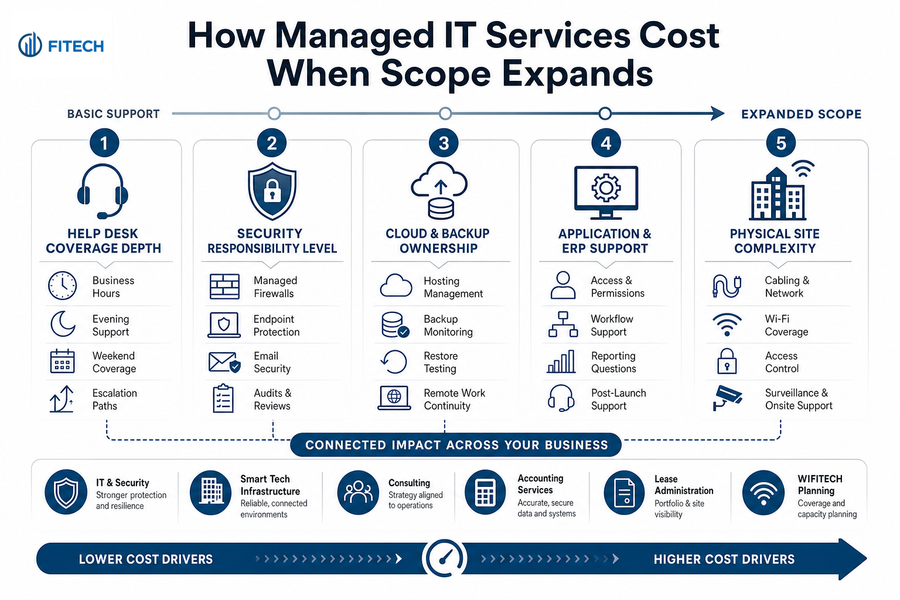
How much does managed IT services cost once support grows beyond basic troubleshooting? The answer changes when your provider shares responsibility for security, infrastructure, compliance readiness, and continuity across daily work. That expanded scope is where our six service pillars matter: Consulting for ERP implementation, Accounting Services, Lease Administration, IT & Security, Smart Tech Infrastructure, and WIFITECH connectivity.
-
Help desk coverage depth Business hours, evening support, weekend coverage, and escalation paths affect staffing and ticket flow. If a password reset blocks payroll approval after hours, coverage design matters.
-
Security responsibility level Managed firewalls, endpoint protection, email security, and audits require ongoing review, not one-time setup.
-
Cloud and backup ownership Hosting, backup monitoring, restore testing, and remote work continuity add accountability. A backup alert has to lead to action.
-
Application and ERP support Access, permissions, workflow blockers, reporting questions, and post-launch support need platform context.
-
Physical site complexity Cabling, Wi-Fi, access control, surveillance, and onsite troubleshooting connect infrastructure, security, support, and WIFITECH planning.
Using A Managed IT Services Calculator Without Oversimplifying Risk
A managed IT services calculator helps build a planning baseline, but shallow inputs miss the work hiding inside cloud usage, security ownership, and application support. IDC reported that 59% of cloud buyers expected similar overruns in 2024 after spending more than expected in 2023, which is why we start discovery with people, systems, workflows, devices, locations, security needs, and business priorities before recommending a support model.
-
Count active users, shared workstations, mobile devices, and spare laptops used for onboarding.
-
List every office, site network, Wi-Fi environment, internet connection, and support handoff.
-
Define response coverage, after-hours needs, approval rules, and escalation expectations.
-
Separate included security tools from items billed as add-ons.
-
Flag systems needing specialist support, including Yardi, MRI, RealPage, Microsoft 365, cloud hosting, backups, and endpoint protection.
The right inputs make comparison easier without pretending a calculator can replace discovery. Focus the follow-up comparison on help desk coverage, endpoint security, cloud backups, ERP support.
Building A Managed IT Services ROI Calculator Around Business Outcomes
A managed IT services ROI calculator should translate support into time returned, downtime avoided, cleaner access control, better backup readiness, and fewer vendor handoffs. For context, one Microsoft 365 Business analysis found an ROI of 223%, while a separate Copilot analysis reported a 6.75% decrease in other AI-related tool, project, or external spend; the stronger planning lesson is simple: return comes from removing repeat work and reducing operational drag. Our help desk model is designed to reduce recurring IT issues by up to 90% and resolve most support requests on the first call by connecting ERP, IT, accounting, infrastructure, and security context.
-
Time returned to staff Track recurring IT problems, password resets, device setup, and Microsoft 365 access delays.
-
Downtime avoided across systems Include network issues, server problems, backup failures, and connectivity gaps.
-
Risk reduced over time Patching, endpoint protection, managed firewalls, and monitoring build maturity through steady follow-through.
-
Vendor handoffs removed Our model connects IT, ERP, accounting workflows, lease administration, infrastructure, and security so repeat issues can be traced to root causes.
Clarify Your IT Pricing
See how FITECH maps managed IT costs to support, security, access, and daily operations so you know what your spend is covering.
Why Managed IT Costs Rise When Vendors Work Separately
An accounting workflow breaks before close. The ERP vendor points to user permissions, the IT provider blames the network, and the connectivity vendor asks for another trace route. Managed IT costs rise because your staff becomes the coordinator, repeating the same facts while the approval deadline gets closer.
-
Repeated discovery calls: The same invoice approval path, user role, and error message get explained again.
-
Slow provider escalations: Tickets wait while vendors decide where responsibility starts and stops.
-
Security gaps between systems: Access control, surveillance, network security, firewalls, endpoint protection, and email security need shared context.
-
Recurring reporting issues: Reports and permissions fail again when no one fixes the underlying workflow.
Changing an operating model is difficult, especially when people, permissions, vendors, and daily service expectations are already in motion. We built our model to remove those gaps by connecting IT, ERP, accounting, lease administration, cybersecurity, smart infrastructure, and WIFITECH connectivity where the workflow requires it.
Reading A Managed IT Services Price List With The Right Questions
Read a managed IT services price list as an operating model, not a menu. The goal isn’t to find the longest inclusion list; it’s to understand who owns the work when a ticket crosses Microsoft 365, backups, ERP access, a network closet, and a security review.
-
What is included in monthly support, and what becomes project work when a data migration or device refresh appears?
-
Are Microsoft 365, backup, cloud hosting, patching, endpoint protection, and firewall management included?
-
How are onsite support, after-hours tickets, and escalation handled when a site loses connectivity?
-
Can the provider support ERP and accounting workflows, or does every reporting issue become a separate engagement?
-
How does the provider track repeat tickets and fix root causes across corporate systems and physical site technology?
Choosing A Pricing Model That Supports Long-Term Growth
Pricing should reflect the support model, security responsibility, systems complexity, locations, and business continuity expectations behind your daily work, from a Microsoft 365 access request to a backup restore or Wi-Fi ticket.
At FITECH, we start with discovery, then connect managed IT, IT & Security, ERP support, accounting workflows, smart infrastructure, and WIFITECH connectivity around the root causes that create repeat work, with a global delivery model that supports extended coverage needs.
If you’re reviewing your current model, pricing assumptions, or operational roadmap, contact us and we’ll help you sort what needs coverage now and what should be planned next.